Let the important things surface.
In the desktop preview, your connected email is checked automatically while REI is open and your computer is awake.
REI · A calmer university day
Your classes, tasks, and important university updates. Together in one place, with a little help making sense of it all.
No installation or account needed for the demo. All demo messages and summaries are examples.
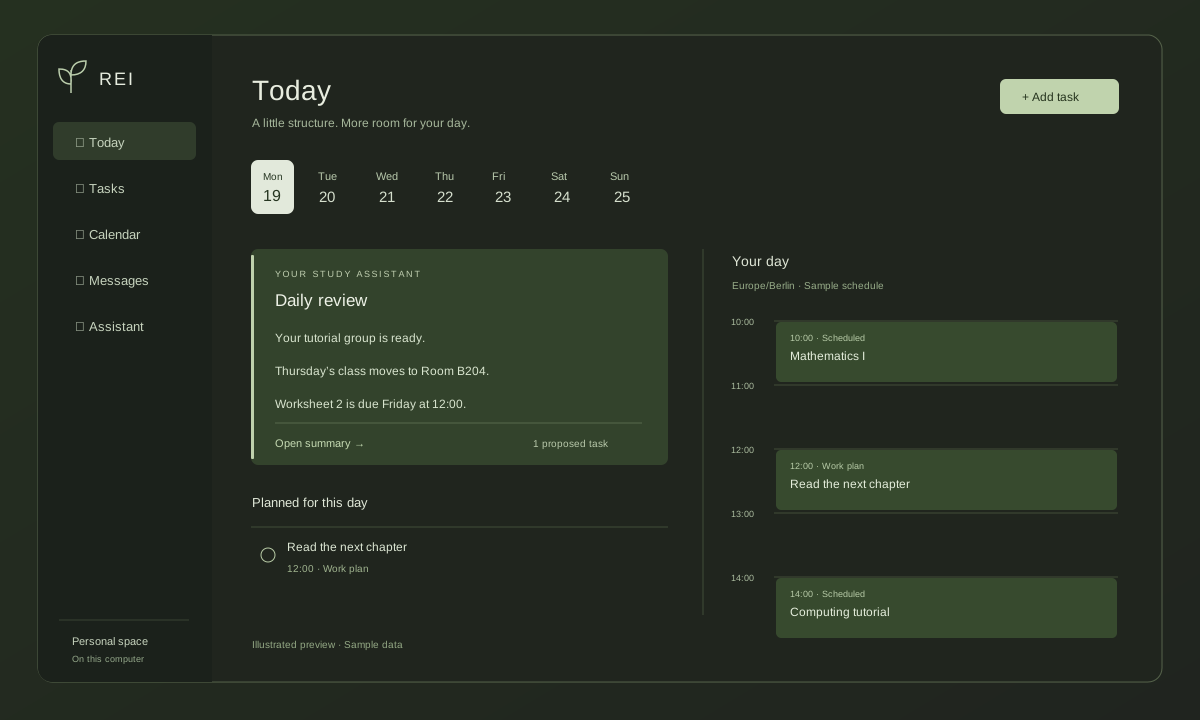 Explore the demo →
From a busy inbox to a clearer day
In the desktop preview, your connected email is checked automatically while REI is open and your computer is awake.
AI prepares important updates and proposed tasks. Open the original message beside the summary, and approve changes yourself.
Keep one-time tasks and repeating classes separate. Plan focused work in Today and see your saved schedule across the month.
Built around your day
REI OS · 0.1.0 Beta 2
The real desktop app, with your own messages and saved plans. These are early beta builds; the browser demo above stays separate and uses sample data.
Windows is unsigned; the Mac beta is ad-hoc signed and not Apple-notarized. Your system may block the first opening. Release notes and checksums ↗
For AI, choose local Ollama with an installed model, or configure your own supported API key in Settings. Accounts and models are not included in the download.
REI beta feedback
Found a problem or have an idea? Tell me what happened and what would make REI more useful for you.
For bugs, include your app version, operating system, and the steps that led to the problem. GitHub reports are public; email is available if you prefer.
An honest preview
REI is a desktop app in development. This browser demo demonstrates its planning workflow using sample data and prewritten summaries; it does not run the desktop backend or a live AI model.
Email supports HIZ, secure provider discovery, and Google/Microsoft browser sign-in. Google sign-in is currently limited to invited beta testers, and university account policies may require approval. Teams, cloud sync, and a full conversational assistant with searchable memory are not available in this preview. Windows and Apple Silicon Mac opening and email sign-in have been tested by the creator; wider device testing is ongoing.
Take a look around ↗